If you use What’s Up Docker to monitor your containers but see a WUD error 429 Docker Hub fix notification, you’ve hit the API rate limit. Even with a login, hidden triggers can exhaust your 200 requests per 6 hours limit. Let’s look at how to stop this ‘avalanche’ of requests.
Introduction
I use WUD to monitor new versions of my Docker containers. I received an email yesterday that an update was available for 6 containers, but I didn’t log in to WUD yesterday and update the containers. However, later in the web interface I saw only two update requests, which made me suspicious.
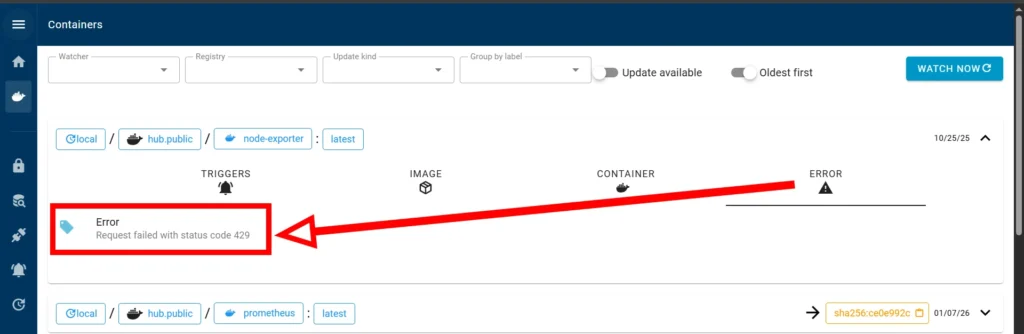
Error Request failed with status code 429
Today I decided to re-enter the WUD web interface, and saw the error: Error – Request failed with status code 429
Why is this happening? I already tried to avoid this, I registered and logged in to Docker Hub, and I also created a Cron so that the update check would only occur once a day at 12 noon, and not constantly, so as not to exceed the limit on the number of requests.
Error 429 (Too Many Requests) actually means that you have reached the limit for requests to Docker Hub. For authorized free accounts, this limit is 200 requests per 6 hours.
Reason for the error
To identify the cause of the constant requests, I looked at the service logs and saw that the service starts with the following parameters:
INFO whats-up-docker/watcher.docker.local: Register with configuration {"cron":"0 0 12 * * *","socket":"/var/run/docker.sock","port":2375,"jitter":60000,"watchbydefault":true,"watchall":false,"watchevents":true,"watchatstart":true}From the logs it can be seen that two parameters have an active status:
- “watchevents”:true
- “watchatstart”:true
I will look at each parameter in more detail
watchevents
The WATCHEVENTS parameter determines whether WUD will constantly “listen” to local Docker daemon events. If this feature is enabled (defaults to true), the service automatically initiates an out-of-order update check whenever the state of any monitored container changes – for example, when it is created, stopped, or manually restarted. On the one hand, this allows the system to instantly respond to changes in the infrastructure, but on the other hand, during mass manual container updates, WUD generates an avalanche of requests to registries (such as Docker Hub). This quickly exhausts free API limits, nullifies the configured cron schedule, and leads to blocking with error 429 (Too Many Requests).
watchatstart
The WATCHATSTART parameter is responsible for the behavior of WUD during its own start or restart. The enabled parameter forces the service to immediately perform a full check of all containers immediately after startup, without waiting for the next cron timer to run. While this is convenient for obtaining the current status immediately after the server is up, frequent restarts of the WUD container itself (for example, during configuration tuning or frequent deployments) will generate a large number of simultaneous requests. Disabling this parameter helps to strictly adhere to the specified schedule and save precious limits on requests to Docker Hub.
This issue often arises right after the initial setup, which I covered in my previous guide on Docker container version control WUD.
Configuration change
To fix the error, simply disable these parameters in the docker configuration, in the environment variables block:
environment:
  - WUD_WATCHER_LOCAL_WATCHEVENTS=false
  - WUD_WATCHER_LOCAL_WATCHATSTART=false
For the actions to take effect, you must restart the container with the command
docker compose up -dand wait 6 hours until the restriction is automatically lifted from the Docker Hub.
To see how these updates affect your system performance in real-time, you can check your monitoring Docker container activity in Zabbix.
Conclusion
Disabling WATCHEVENTS and WATCHATSTART is an important step for stable operation of What’s Up Docker, especially when using free Docker Hub accounts with their hard limits. Although these features by default provide instant response to changes, in practice they generate an avalanche of background requests during any manual manipulation of containers or server restarts, which quickly leads to blocking and error 429 (Too Many Requests).
By giving full control over the check schedule exclusively to the cron scheduler, you eliminate unpredictable network traffic, effectively preserve API quotas, and guarantee yourself reliable, quiet monitoring of infrastructure updates without the risk of sudden outages.