
In this WordPress performance test Raspberry Pi 4 vs 5, I compare two generations of hardware in a real production environment to see if the upgrade justifies the effort.
Introduction
Migrating websites to new hardware is always accompanied by expectations of improved performance. This is especially true for WordPress – a system that heavily relies on the database, file system, and caching mechanisms. In my case, the main production website had been running for many years on a Raspberry Pi 4 using a microSD card as storage. After moving to a Raspberry Pi 5 equipped with an NVMe SSD, it was time to evaluate how much this hardware upgrade actually affects page load speed, overall performance, CPU utilization, and the real number of requests the web server can handle.
The software stack also matters. I previously did a WordPress benchmark comparing Apache vs. Nginx, and for those looking for a cleaner setup, here is how to migrate WordPress to Docker on a Raspberry Pi.
In this article, I compare two generations of Raspberry Pi in a real WordPress environment using the Apache Benchmark utility. To measure CPU load during testing, I also run the pidstat utility, which provides real-time CPU usage statistics.
Based on the collected data, I build charts for visual comparison. However, it makes sense to start with a comparison of the hardware itself.
Hardware Overview
Overall, the performance gain is noticeable even without running benchmarks. The CPU upgrade, improved memory, and the transition to NVMe SSD storage all play a significant role. In this test, the Raspberry Pi 5 is equipped with a 256 GB Samsung SSD (MZ9L4256HCJQ-00BD1), and the PCIe 3.0 interface is enabled.
| Component | Raspberry Pi 4 | Raspberry Pi 5 |
|---|---|---|
| CPU (ARM) | Cortex-A72 @ 1.5 GHz | Cortex-A76 @ 2.4 GHz |
| RAM | 8 GB LPDDR4 | 8 GB LPDDR4X |
| Storage | microSD 50 MB/s | NVMe SSD 900 MB/s |
| Disk bus | SD | PCIe 3.0 ×1 |
The transition to NVMe is the biggest change here. For more details on the drive I used, see my review of the Samsung NVMe SSD for Raspberry Pi 5 and my guide on how to set up NVMe storage on Raspberry Pi 5.
Now we can move on directly to the benchmarks.
Apache Benchmark Test
ApacheBench (ab) is a command-line tool used to measure web server performance. It simulates load by sending a large number of concurrent requests to a website and measures how quickly the server responds. In this test, I used the following command:
ab -n 200 -c 50 -H "Host: ostrich.kyiv.ua" https://192.168.XXX.XXX/en/Here is what these parameters mean:
-n 200— total number of requests (200 page loads)-c 50— number of concurrent clients (simulation of 50 visitors at the same time)-H "Host: ostrich.kyiv.ua"— forces the Host headerhttps://192.168.XXX.XXX/en/— the local address being tested
ApacheBench does not test WordPress directly; instead, it stresses the entire request-processing chain:
TCP → (TLS) → nginx → (PHP-FPM) → (MySQL) → диск → RAM → CPU
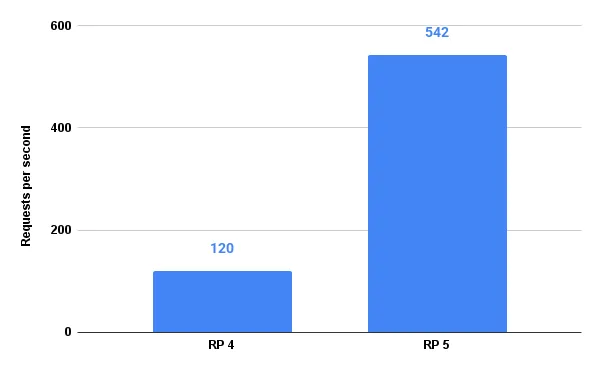
The result of this test reflects the combined performance of all components and shows the total number of requests per second. On the chart, higher values indicate better performance.
To measure CPU load, I used the pidstat utility from the sysstat package. This tool captures CPU usage statistics every second:
pidstat -u 1Of course, this is not a perfectly precise measurement. The Apache Benchmark test lasts around two seconds, meaning only two samples can be collected per run. To achieve at least some level of accuracy, I ran the test three times and calculated the average values. Based on these averages, I built a chart where lower values indicate better results.
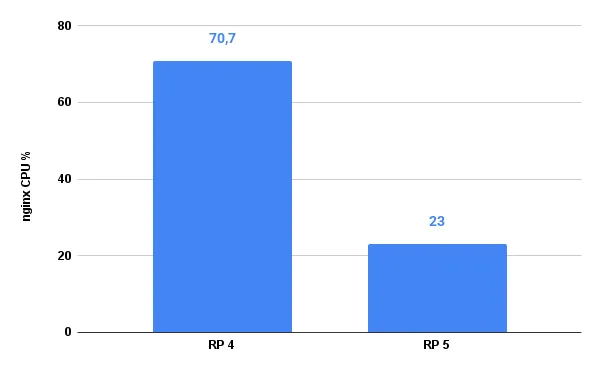
As for the database, CPU usage remained the same in both cases and was only about 1% of total CPU capacity — most likely due to enabled caching.
Conclusions
Even a basic comparison between Raspberry Pi 4 and Raspberry Pi 5 in a real WordPress environment shows a significant difference in performance. The Apache Benchmark results clearly demonstrate a substantial increase in requests per second, as well as reduced server response time after upgrading to the newer hardware generation.
Several key factors contribute to this performance gain: the more modern Cortex-A76 CPU architecture with higher clock speeds, faster RAM, and — most importantly for WordPress — the switch from microSD storage to an NVMe SSD via the PCIe 3.0 interface. The storage subsystem has a major impact on cache performance, PHP execution, database operations, and file I/O in general.
CPU load analysis shows that Raspberry Pi 5 has a much larger performance headroom even under peak load, while Raspberry Pi 4 operates much closer to its limits. At the same time, database load remained minimal in both scenarios, confirming the effectiveness of WordPress caching and shifting the main bottlenecks toward CPU and storage performance.
Therefore, even with the relatively high-level nature of these tests, it is safe to conclude that for self-hosted WordPress deployments, upgrading from Raspberry Pi 4 to Raspberry Pi 5 paired with an NVMe SSD delivers a real-world performance boost of approximately 3–4×, significantly improving site stability under load.
Before running these tests, I had to move my data. You can check how I handled it in my post on moving a WordPress site to a new Raspberry Pi using rsync . To squeeze even more speed out of your setup, consider setting up Redis Object Cache for WordPress.