
Introduction
Postfix email forwarding is a versatile feature that allows you to redirect messages to external addresses easily. In this guide, I’ll focus on user-level forwarding using the .forward file and how to identify these messages using header_checks in a Maildir environment. Postfix is a popular Mail Transfer Agent (MTA) that allows email forwarding through various mechanisms. This guide covers user-level forwarding.
My Postfix is configured to store email in the home user directory. It means each system user has its own mailbox. You can see this feature in the /etc/postfix/main.cf file:
home_mailbox = Maildir/Since users are created as local system accounts, email forwarding needs to be handled using the ~/.forward file for each specific user.
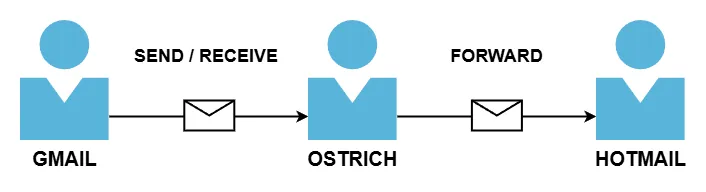
Need to perform configuration and test by the next steps:
- Creating the Forwarding File
- Identifying Forwarded Emails
- Verifying Forwarding
Creating the Forwarding File
To create the forwarding file, use the terminal with sudo rights. In this example, I will use the “ostrich” account.
sudo nano /home/ostrich/.forwardAdd only the address to which emails will be forwarded
[email protected]With this setup, forwarded emails will not be saved on the server. To keep the forwarded emails on the server, you need to add the user’s name followed by a slash before the forwarding address. This way, the forwarded email will remain on the server.
\ostrich, [email protected]After saving the changes, it’s recommended to change the file’s permissions
chmod 600 /home/ostrich/.forward
chown ostrich:ostrich /home/ostrich/.forward
If you prefer a web interface for managing your mail system, you might want to read my guide on configuring PostfixAdmin to manage mailboxes.
Identifying Forwarded Emails
In Postfix, it’s possible to add an identifier or signature to forwarded emails. I will do this using header_checks. This method allows modifying the message headers before forwarding.
In the main.cf configuration file, add the following line:
header_checks = regexp:/etc/postfix/header_checksSince this file doesn’t exist yet, create it and add the header modification line
sudo nano /etc/postfix/header_checksAdd the following line
/^Received:/ PREPEND X-Forwarded-By: Ostrich MailThis line adds a new header X-Forwarded-By: Ostrich Mail to each email that passes through Postfix and contains a Received header.
After that, restart the Postfix service
systemctl restart postfixNow, let’s move on to test
Verifying Forwarding
I sent an email from my Gmail account to my Ostrich account, which was then forwarded to my Hotmail server.
After logging in to Hotmail, I opened the email and reviewed the headers.
X-Forwarded-By: Ostrich MailThe X-Forwarded-By header was present, confirming that the settings were correctly applied, and the service was working as expected
Once your forwarding is active, it’s crucial to keep an eye on your mail queue; check out how I set up monitoring Postfix activity by Zabbix to ensure everything runs smoothly.
Conclusion
The email forwarding process in Postfix can be efficiently configured by setting up the ~/.forward file and utilizing the header_checks to add identifiers like X-Forwarded-By. This ensures both the proper forwarding of messages and clear identification of forwarded emails.